---
vssueId: 175
layout: LearningLayout
description: Kubernetes教程_Role-based_access_control_(RBAC)基于角色的访问控制_是Kubernetes中支持的一种授权方式。使用rbac.authorization.k8s.io_API来驱动授权决策_允许管理员通过该API动态配置授权策略。
meta:
- name: keywords
content: Kubernetes 教程,Kubernetes 授权,Kubernetes RBAC, Kubernetes权限
---
# RBAC Example
> 本文转载自 [YP小站](https://mp.weixin.qq.com/s/-CfC_-1XOZHZZD_pHEaX0Q)
## 什么是 Kubernetes RBAC
`基于角色的访问控制(Role-Based Access Control, 即 "RBAC")`:使用 “rbac.authorization.k8s.io” API Group 实现授权决策,允许管理员通过 Kubernetes API 动态配置策略。
RBAC 从 `Kubernetes v1.6 处于beta版本`,从 `v1.8 开始`,RBAC已作为 `稳定的功能`。启用 RBAC,请使用 `--authorization-mode=RBAC` 启动 API Server。
## API 概述
本节将介绍`RBAC API`所定义的`四种顶级类型`。用户可以像使用其他Kubernetes API资源一样 (例如通过kubectl、API调用等)与这些资源进行交互。例如,命令 `kubectl create -f (resource).yml` 可以被用于以下所有的例子,当然,读者在尝试前可能需要先阅读以下相关章节的内容。
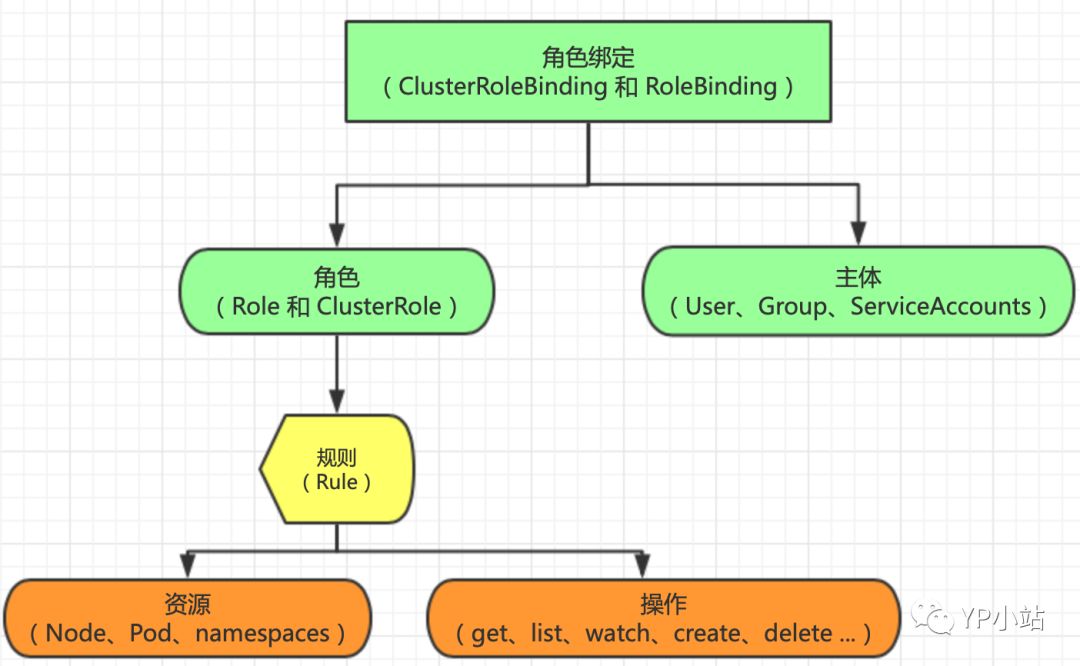
## RBAC 简易概览图
## ClusterRole 与 Role
```
Role(角色)`:是一系列权限的集合,例如一个角色可以包含读取 Pod 的权限和列出 Pod 的权限。Role `只能用来给某个特定 namespace 中的资源作鉴权`。对 namespace 、集群级资源 和 非资源类的 API(如 /healthz)使用 `ClusterRole
```
`ClusterRole`:对象可以授予与 Role 对象相同的权限,但由于它们属于集群范围对象,也可以使用它们授予对以下几种资源的访问权限:
- 集群范围资源(例如节点,即 node)
- 非资源类型 endpoint(例如 /healthz)
- 授权多个 Namespace
下面例子描述了 default namespace 中的一个 Role 对象的定义,用于授予对 pod 的读访问权限
``` yaml
kind: Role
apiVersion: rbac.authorization.k8s.io/v1beta1
metadata:
namespace: default
name: demo-role
rules:
- apiGroups: [""] # 空字符串""表明使用 core API group
resources: ["pods"]
verbs: ["get", "watch", "list", "create", "delete"]
```
下面例子中 ClusterRole 定义可用于授予用户对`某一个 namespace`,或者 `所有 namespace`的 secret(取决于其绑定方式)的读访问权限
```yaml
kind: ClusterRole
apiVersion: rbac.authorization.k8s.io/v1beta1
metadata:
# ClusterRole 是集群范围对象,没有 "namespace" 区分
name: demo-clusterrole
rules:
- apiGroups: [""]
resources: ["secrets"]
verbs: ["get", "watch", "list", "create", "delete"]
```
## ClusterRoleBinding 与 RoleBinding
`RoleBinding`:把 Role 或 ClusterRole 中定义的各种权限映射到 User,Service Account 或者 Group,从而让这些用户继承角色在 namespace 中的权限。
`ClusterRoleBinding`:让用户继承 ClusterRole 在整个集群中的权限。
`RoleBinding` 可以引用在同一命名空间内定义的Role对象。
```yaml
# 以下角色绑定定义将允许用户 "jane" 从 "default" 命名空间中读取pod
kind: RoleBinding
apiVersion: rbac.authorization.k8s.io/v1beta1
metadata:
name: read-pods
namespace: default
subjects:
- kind: User
name: jane
apiGroup: rbac.authorization.k8s.io
roleRef:
kind: Role
name: pod-reader
apiGroup: rbac.authorization.k8s.io
```
`RoleBinding` 对象也可以引用一个 `ClusterRole` 对象用于在 `RoleBinding` 所在的命名空间内授予用户对所引用的`ClusterRole` 中定义的命名空间资源的访问权限。这一点允许管理员在整个集群范围内首先定义一组通用的角色,然后再在不同的命名空间中复用这些角色。
例如,尽管下面示例中的 RoleBinding 引用的是一个 ClusterRole 对象,但是用户”dave”(即角色绑定主体)还是只能读取”development” 命名空间中的 secret(即RoleBinding所在的命名空间)
```yaml
# 以下角色绑定允许用户"dave"读取"development"命名空间中的secret。
kind: RoleBinding
apiVersion: rbac.authorization.k8s.io/v1beta1
metadata:
name: read-secrets
namespace: development # 这里表明仅授权读取"development"命名空间中的资源。
subjects:
- kind: User
name: dave
apiGroup: rbac.authorization.k8s.io
roleRef:
kind: ClusterRole
name: secret-reader
apiGroup: rbac.authorization.k8s.io
```
最后,可以使用 `ClusterRoleBinding` 在集群级别和所有命名空间中授予权限。下面示例中所定义的 `ClusterRoleBinding` 允许在用户组 ”manager” 中的任何用户都可以读取集群中任何命名空间中的 secret 。
```yaml
# 以下`ClusterRoleBinding`对象允许在用户组"manager"中的任何用户都可以读取集群中任何命名空间中的secret。
kind: ClusterRoleBinding
apiVersion: rbac.authorization.k8s.io/v1beta1
metadata:
name: read-secrets-global
subjects:
- kind: Group
name: manager
apiGroup: rbac.authorization.k8s.io
roleRef:
kind: ClusterRole
name: secret-reader
apiGroup: rbac.authorization.k8s.io
```
## 对资源的引用
大多数资源由代表其名字的字符串表示,例如 ”pods”,就像它们出现在相关API endpoint 的URL中一样。然而,有一些Kubernetes API还 包含了”子资源”,比如 `pod` 的 `logs`。在Kubernetes中,pod logs endpoint的URL格式为:
```
GET /api/v1/namespaces/{namespace}/pods/{name}/log
```
在这种情况下,”pods”是命名空间资源,而”log”是pods的子资源。为了在RBAC角色中表示出这一点,我们需要使用斜线来划分资源 与子资源。如果需要角色绑定主体读取pods以及pod log,您需要定义以下角色:
```yaml
kind: Role
apiVersion: rbac.authorization.k8s.io/v1beta1
metadata:
namespace: default
name: pod-and-pod-logs-reader
rules:
- apiGroups: [""]
resources: ["pods", "pods/log"]
verbs: ["get", "list"]
```
通过 `resourceNames` 列表,角色可以针对不同种类的请求根据资源名引用资源实例。当指定了 `resourceNames` 列表时,不同动作 种类的请求的权限,如使用 ”get”、”delete”、”update”以及”patch”等动词的请求,将被限定到资源列表中所包含的资源实例上。例如,如果需要限定一个角色绑定主体只能 ”get” 或者 ”update” 一个 `configmap` 时,您可以定义以下角色:
```yaml
kind: Role
apiVersion: rbac.authorization.k8s.io/v1beta1
metadata:
namespace: default
name: configmap-updater
rules:
- apiGroups: [""]
resources: ["configmap"]
resourceNames: ["my-configmap"]
verbs: ["update", "get"]
```
值得注意的是,如果设置了 `resourceNames`,则请求所使用的动词不能是 `list、watch、create或者deletecollection`。由于资源名不会出现在 `create、list、watch和deletecollection` 等API请求的URL中,所以这些请求动词不会被设置了`resourceNames` 的规则所允许,因为规则中的 `resourceNames` 部分不会匹配这些请求。
## 例子
- 绑定用户能查看所有 namespace
```yaml
apiVersion: rbac.authorization.k8s.io/v1
kind: ClusterRole
metadata:
# 鉴于ClusterRole是集群范围对象,所以这里不需要定 义"namespace"字段
name: view-namespace-clusterrole
rules:
- apiGroups:
- ""
resources:
- namespaces
- namespaces/status
verbs:
- get
- list
- watch
```
- 定义 `develop-role` 用户对 `default` 命名空间详细权限
```yaml
apiVersion: rbac.authorization.k8s.io/v1
kind: Role
metadata:
name: develop-role
namespace: default
rules:
- apiGroups:
- ""
resources:
- endpoints
- serviceaccounts
- configmaps
- persistentvolumeclaims
- persistentvolumes
- services
- replicationcontrollers
- replicationcontrollers/scale
verbs:
- get
- list
- watch
- apiGroups:
- ""
resources:
- pods
- pods/log
- pods/status
- pods/exec
verbs:
- create
- delete
- deletecollection
- patch
- update
- get
- list
- watch
- apiGroups:
- ""
resources:
- bindings
- events
- limitranges
- namespaces/status
- replicationcontrollers/status
- resourcequotas
- resourcequotas/status
verbs:
- get
- list
- watch
- apiGroups:
- ""
resources:
- namespaces
verbs:
- get
- list
- watch
- apiGroups:
- apps
resources:
- daemonsets
- statefulsets
verbs:
- get
- list
- watch
- apiGroups:
- apps
resources:
- deployments
- deployments/scale
- replicasets
- replicasets/scale
verbs:
- get
- list
- watch
- update
- apiGroups:
- autoscaling
resources:
- horizontalpodautoscalers
verbs:
- get
- list
- watch
- apiGroups:
- batch
resources:
- cronjobs
- jobs
verbs:
- get
- list
- watch
- apiGroups:
- extensions
resources:
- daemonsets
- statefulsets
- ingresses
- networkpolicies
verbs:
- get
- list
- watch
- apiGroups:
- extensions
resources:
- deployments
- deployments/scale
- replicasets
- replicasets/scale
- replicationcontrollers/scale
verbs:
- get
- list
- watch
- update
- apiGroups:
- policy
resources:
- poddisruptionbudgets
verbs:
- get
- list
- watch
- apiGroups:
- networking.k8s.io
resources:
- networkpolicies
verbs:
- get
- list
- watch
```
## 默认角色 与 默认角色绑定
`API Server` 会创建一组默认的 `ClusterRole` 和 `ClusterRoleBinding` 对象。这些默认对象中有许多包含 `system:` 前缀,表明这些资源由 `Kubernetes基础组件”拥有”`。对这些资源的修改可能`导致非功能性集群`(non-functional cluster)。一个例子是 `system:node ClusterRole` 对象。这个角色定义了 `kubelet` 的权限。如果这个角色被修改,可能会导致`kubelet` 无法正常工作。
所有默认的 `ClusterRole` 和 `ClusterRoleBinding` 对象都会被标记为 `kubernetes.io/bootstrapping=rbac-defaults`。
## 面向用户的角色
通过命令 `kubectl get clusterrole` 查看到并不是所有都是以 `system:前缀`,它们是`面向用户的角色`。这些角色包含`超级用户角色(cluster-admin`),即旨在利用 `ClusterRoleBinding(cluster-status)`在集群范围内授权的角色, 以及那些使用 `RoleBinding(admin、edit和view)`在特定命名空间中授权的角色。
- `cluster-admin`:`超级用户权限`,允许对任何资源执行任何操作。在 ClusterRoleBinding 中使用时,可以完全控制集群和所有命名空间中的所有资源。在 RoleBinding 中使用时,可以完全控制 RoleBinding 所在命名空间中的所有资源,包括命名空间自己。
- `admin`:`管理员权限`,利用 RoleBinding 在某一命名空间内部授予。在 RoleBinding 中使用时,允许针对命名空间内大部分资源的读写访问, 包括在命名空间内创建角色与角色绑定的能力。但`不允许对资源配额(resource quota)`或者`命名空间本身`的`写访问`。
- `edit`:允许对某一个命名空间内大部分对象的读写访问,但不允许查看或者修改角色或者角色绑定。
- `view`:允许对某一个命名空间内大部分对象的只读访问。不允许查看角色或者角色绑定。由于可扩散性等原因,`不允许查看 secret 资源`。
> 核心组件角色、其它组件角色 和 控制器(Controller)角色 这里不在一一列出。具体见 [参考链接](https://kubernetes.io/docs/reference/access-authn-authz/rbac/#controller-roles)。
## Permissive RBAC
所谓 `Permissive RBAC` 是指授权给所有的 `Service Accounts` 管理员权限。`不推荐的配置`
```sh
$ kubectl create clusterrolebinding permissive-binding \
--clusterrole=cluster-admin \
--user=admin \
--user=kubelet \
--group=system:serviceaccounts
```
## 创建用户 shell 脚本
```sh
#!/usr/bin/env bash
# 注意修改KUBE_APISERVER为你的API Server的地址
KUBE_APISERVER=$1
USER=$2
USER_SA=system:serviceaccount:default:${USER}
Authorization=$3
USAGE="USAGE: create-user.sh \n
Example: https://192.168.1.2:6443 brand"
CSR=`pwd`/user-csr.json
SSL_PATH="/opt/kubernetes/ssl"
USER_SSL_PATH="/opt/kubernetes/create-user"
SSL_FILES=(ca-key.pem ca.pem ca-config.json)
CERT_FILES=(${USER}.csr $USER-key.pem ${USER}.pem)
if [[ $KUBE_APISERVER == "" ]]; then
echo -e $USAGE
exit 1
fi
if [[ $USER == "" ]];then
echo -e $USAGE
exit 1
fi
if [[ $Authorization == "" ]];then
echo -e $USAGE
exit 1
fi
# 创建用户的csr文件
function createCSR(){
cat>$CSR< /dev/null
if (( $? !=0 ));then
echo "${Authorization} clusterrole there is no"
exit 1
fi
}
# 判断clusterrole授权是否存在
ifClusterrole
# 判断证书文件是否存在
for f in ${SSL_FILES[@]};
do
echo "Check if ssl file $f exist..."
ifExist $f
echo "OK"
done
echo "Create CSR file..."
createCSR
echo "$CSR created"
echo "Create user's certificates and keys..."
cd $USER_SSL_PATH
cfssl gencert -ca=${SSL_PATH}/ca.pem -ca-key=${SSL_PATH}/ca-key.pem -config=${SSL_PATH}/ca-config.json -profile=kubernetes $CSR| cfssljson -bare $USER_SA
# 创建 sa
kubectl create sa ${USER} -n default
# 设置集群参数
kubectl config set-cluster kubernetes \
--certificate-authority=${SSL_PATH}/ca.pem \
--embed-certs=true \
--server=${KUBE_APISERVER} \
--kubeconfig=${USER}.kubeconfig
# 设置客户端认证参数
kubectl config set-credentials ${USER_SA} \
--client-certificate=${USER_SSL_PATH}/${USER_SA}.pem \
--client-key=${USER_SSL_PATH}/${USER_SA}-key.pem \
--embed-certs=true \
--kubeconfig=${USER}.kubeconfig
# 设置上下文参数
kubectl config set-context kubernetes \
--cluster=kubernetes \
--user=${USER_SA} \
--namespace=development \
--kubeconfig=${USER}.kubeconfig
# 设置默认上下文
kubectl config use-context kubernetes --kubeconfig=${USER}.kubeconfig
# 创建 namespace
# kubectl create ns $USER
# 绑定角色
# kubectl create rolebinding ${USER}-admin-binding --clusterrole=admin --user=$USER --namespace=$USER --serviceaccount=$USER:default
kubectl create clusterrolebinding ${USER}-binding --clusterrole=${Authorization} --user=${USER_SA}
# kubectl config get-contexts
echo "Congratulations!"
echo "Your kubeconfig file is ${USER}.kubeconfig"
```