
902 lines
20 KiB
Markdown
902 lines
20 KiB
Markdown
<h1 align="center">
|
|
<br>
|
|
<br>
|
|
<img width="300" alt="Ink" src="media/logo.png">
|
|
<br>
|
|
<br>
|
|
<br>
|
|
</h1>
|
|
|
|
> React for CLIs. Build and test your CLI output using components.
|
|
|
|
[](https://travis-ci.org/vadimdemedes/ink)
|
|
|
|
|
|
## Install
|
|
|
|
```
|
|
$ npm install ink react
|
|
```
|
|
|
|
|
|
## Usage
|
|
|
|
```jsx
|
|
import React, {Component} from 'react';
|
|
import {render, Color} from 'ink';
|
|
|
|
class Counter extends Component {
|
|
constructor() {
|
|
super();
|
|
|
|
this.state = {
|
|
i: 0
|
|
};
|
|
}
|
|
|
|
render() {
|
|
return (
|
|
<Color green>
|
|
{this.state.i} tests passed
|
|
</Color>
|
|
);
|
|
}
|
|
|
|
componentDidMount() {
|
|
this.timer = setInterval(() => {
|
|
this.setState({
|
|
i: this.state.i + 1
|
|
});
|
|
}, 100);
|
|
}
|
|
|
|
componentWillUnmount() {
|
|
clearInterval(this.timer);
|
|
}
|
|
}
|
|
|
|
render(<Counter/>);
|
|
```
|
|
|
|
<img src="media/demo.svg" width="600">
|
|
|
|
You can also check it out live on [repl.it sandbox](https://ink-counter-demo.vadimdemedes.repl.run/).
|
|
Feel free to play around with the code and fork this repl at [https://repl.it/@vadimdemedes/ink-counter-demo](https://repl.it/@vadimdemedes/ink-counter-demo).
|
|
|
|
|
|
## Built with Ink
|
|
|
|
- [emoj](https://github.com/sindresorhus/emoj) - Find relevant emoji on the command-line.
|
|
- [emma](https://github.com/maticzav/emma-cli) - Terminal assistant to find and install npm packages.
|
|
- [swiff](https://github.com/simple-integrated-marketing/swiff) - Multi-environment command line tools for time-saving web developers.
|
|
- [changelog-view](https://github.com/jdeniau/changelog-view) - Tool view changelog in console.
|
|
- [gomoku-terminal](https://github.com/acrazing/gomoku-terminal) - Play online Gomoku in the terminal.
|
|
- [cfpush](https://github.com/mamachanko/cfpush) - An interactive Cloud Foundry tutorial in your terminal.
|
|
- [startd](https://github.com/mgrip/startd) - Turn your React component into a web app from the command-line.
|
|
- [sindresorhus](https://github.com/sindresorhus/sindresorhus) - The Sindre Sorhus CLI.
|
|
|
|
|
|
## Contents
|
|
|
|
- [Getting Started](#getting-started)
|
|
- [Examples](#examples)
|
|
- [API](#api)
|
|
- [Building Layouts](#building-layouts)
|
|
- [Built-in Components](#built-in-components)
|
|
- [Useful Components](#useful-components)
|
|
- [Testing](#testing)
|
|
|
|
|
|
## Getting Started
|
|
|
|
Ink's goal is to provide the same component-based UI building experience that React provides, but for command-line apps. It uses [yoga-layout](https://github.com/facebook/yoga) to allow Flexbox layouts in the terminal. If you are already familiar with React, you already know Ink.
|
|
|
|
The key difference you have to remember is that the rendering result isn't a DOM, but a string, which Ink writes to the output.
|
|
|
|
To ensure all examples work and you can begin your adventure with Ink, make sure to set up Babel with a React preset. After [installing Babel](https://babeljs.io/docs/en/usage), configure it in `package.json`:
|
|
|
|
```json
|
|
{
|
|
"babel": {
|
|
"presets": [
|
|
"@babel/preset-react",
|
|
[
|
|
"@babel/preset-env",
|
|
{
|
|
"targets": {
|
|
"node": true
|
|
}
|
|
}
|
|
]
|
|
]
|
|
}
|
|
}
|
|
```
|
|
|
|
Don't forget to import `React` into every file that contains JSX:
|
|
|
|
```jsx
|
|
import React from 'react';
|
|
import {render, Box} from 'ink';
|
|
|
|
const Demo = () => (
|
|
<Box>
|
|
Hello World
|
|
</Box>
|
|
);
|
|
|
|
render(<Demo/>);
|
|
```
|
|
|
|
|
|
## Examples
|
|
|
|
- [Jest](examples/jest/jest.js) - Implementation of basic Jest UI [(live demo)](https://ink-jest-demo.vadimdemedes.repl.run/).
|
|
- [Counter](examples/counter/counter.js) - Simple counter that increments every 100ms [(live demo)](https://ink-counter-demo.vadimdemedes.repl.run/).
|
|
- [Form with Validation](https://github.com/final-form/rff-cli-example) - Using framework agnostic form library, [🏁 Final Form](https://github.com/final-form/final-form#-final-form) to manage input state.
|
|
|
|
|
|
## API
|
|
|
|
Since Ink is a React renderer, it means that all features of React are supported.
|
|
Head over to [React](https://reactjs.org) website for documentation on how to use it.
|
|
In this readme only Ink's methods will be documented.
|
|
|
|
#### render(tree, options)
|
|
|
|
Returns: `Instance`
|
|
|
|
Mount a component and render the output.
|
|
|
|
##### tree
|
|
|
|
Type: `ReactElement`
|
|
|
|
##### options
|
|
|
|
Type: `Object`
|
|
|
|
###### stdout
|
|
|
|
Type: `stream.Writable`<br>
|
|
Default: `process.stdout`
|
|
|
|
Output stream where app will be rendered.
|
|
|
|
###### stdin
|
|
|
|
Type: `stream.Readable`<br>
|
|
Default: `process.stdin`
|
|
|
|
Input stream where app will listen for input.
|
|
|
|
###### exitOnCtrlC
|
|
|
|
Type: `boolean`<br>
|
|
Default: `true`
|
|
|
|
Configure whether Ink should listen to Ctrl+C keyboard input and exit the app.
|
|
This is needed in case `process.stdin` is in [raw mode](https://nodejs.org/api/tty.html#tty_readstream_setrawmode_mode), because then Ctrl+C is ignored by default and process is expected to handle it manually.
|
|
|
|
###### debug
|
|
|
|
Type: `boolean`<br>
|
|
Default: `false`
|
|
|
|
If `true`, each update will be rendered as a separate output, without replacing the previous one.
|
|
|
|
```jsx
|
|
import React, {Component} from 'react';
|
|
import {render, Box} from 'ink';
|
|
|
|
class Counter extends Component {
|
|
constructor() {
|
|
super();
|
|
|
|
this.state = {
|
|
i: 0
|
|
};
|
|
}
|
|
|
|
render() {
|
|
return (
|
|
<Box>
|
|
Iteration #{this.state.i}
|
|
</Box>
|
|
);
|
|
}
|
|
|
|
componentDidMount() {
|
|
this.timer = setInterval(() => {
|
|
this.setState(prevState => ({
|
|
i: prevState.i + 1
|
|
}));
|
|
}, 100);
|
|
}
|
|
|
|
componentWillUnmount() {
|
|
clearInterval(this.timer);
|
|
}
|
|
}
|
|
|
|
const app = render(<Counter/>);
|
|
|
|
setTimeout(() => {
|
|
// Enough counting
|
|
app.unmount();
|
|
}, 1000);
|
|
```
|
|
|
|
There's also a shortcut to avoid passing `options` object:
|
|
|
|
```jsx
|
|
render(<Counter>, process.stdout);
|
|
```
|
|
|
|
#### Instance
|
|
|
|
This is the object that `render()` returns.
|
|
|
|
##### rerender
|
|
|
|
Replace previous root node with a new one or update props of the current root node.
|
|
|
|
```jsx
|
|
// Update props of the root node
|
|
const {rerender} = render(<Counter count={1}/>);
|
|
rerender(<Counter count={2}/>);
|
|
|
|
// Replace root node
|
|
const {rerender} = render(<OldCounter/>);
|
|
rerender(<NewCounter/>);
|
|
```
|
|
|
|
##### unmount
|
|
|
|
Manually unmount the whole Ink app.
|
|
|
|
```jsx
|
|
const {unmount} = render(<MyApp/>);
|
|
unmount();
|
|
```
|
|
|
|
##### waitUntilExit
|
|
|
|
Returns a promise, which resolves when app is unmounted.
|
|
|
|
```jsx
|
|
const {unmount, waitUntilExit} = render(<MyApp/>);
|
|
|
|
setTimeout(unmount, 1000);
|
|
|
|
await waitUntilExit(); // resolves after `unmount()` is called
|
|
```
|
|
|
|
## Building Layouts
|
|
|
|
Ink uses [Yoga](https://github.com/facebook/yoga) - a Flexbox layout engine to build great user interfaces for your CLIs.
|
|
It's important to remember that each element is a Flexbox container.
|
|
Think of it as if each `<div>` in the browser had `display: flex`.
|
|
See `<Box>` built-in component below for documentation on how to use Flexbox layouts in Ink.
|
|
|
|
|
|
### Built-in Components
|
|
|
|
#### `<Box>`
|
|
|
|
`<Box>` it's an essential Ink component to build your layout. It's like a `<div style="display: flex">` in a browser.
|
|
|
|
Import:
|
|
|
|
```js
|
|
import {Box} from 'ink';
|
|
```
|
|
|
|
##### Dimensions
|
|
|
|
###### width
|
|
|
|
Type: `number`, `string`
|
|
|
|
Width of the element in spaces. You can also set it in percent, which will calculate the width based on the width of parent element.
|
|
|
|
```jsx
|
|
<Box width={4}>X</Box> //=> 'X '
|
|
```
|
|
|
|
```jsx
|
|
<Box width={10}>
|
|
<Box width="50%">X</Box>
|
|
Y
|
|
</Box> //=> 'X Y'
|
|
```
|
|
|
|
###### height
|
|
|
|
Type: `number`, `string`
|
|
|
|
Height of the element in lines (rows). You can also set it in percent, which will calculate the height based on the height of parent element.
|
|
|
|
```jsx
|
|
<Box height={4}>X</Box> //=> 'X\n\n\n'
|
|
```
|
|
|
|
```jsx
|
|
<Box height={6} flexDirection="column">
|
|
<Box height="50%">X</Box>
|
|
Y
|
|
</Box> //=> 'X\n\n\nY\n\n'
|
|
```
|
|
|
|
###### minWidth
|
|
|
|
Type: `number`
|
|
|
|
Sets a minimum width of the element. Percentages aren't supported yet, see https://github.com/facebook/yoga/issues/872.
|
|
|
|
###### minHeight
|
|
|
|
Type: `number`
|
|
|
|
Sets a minimum height of the element. Percentages aren't supported yet, see https://github.com/facebook/yoga/issues/872.
|
|
|
|
##### Wrapping
|
|
|
|
###### textWrap
|
|
|
|
Type: `string`<br>
|
|
Values: `wrap` `truncate` `truncate-start` `truncate-middle` `truncate-end`
|
|
|
|
This property tells Ink to wrap or truncate text content of `<Box>` if its width is larger than container. If `wrap` is passed, Ink will wrap text and split it into multiple lines. If `truncate-*` is passed, Ink will truncate text instead, which will result in one line of text with the rest cut off.
|
|
|
|
*Note:* Ink doesn't wrap text by default.
|
|
|
|
```jsx
|
|
<Box textWrap="wrap">Hello World</Box>
|
|
//=> 'Hello\nWorld'
|
|
|
|
// `truncate` is an alias to `truncate-end`
|
|
<Box textWrap="truncate">Hello World</Box>
|
|
//=> 'Hello…'
|
|
|
|
<Box textWrap="truncate-middle">Hello World</Box>
|
|
//=> 'He…ld'
|
|
|
|
<Box textWrap="truncate-start">Hello World</Box>
|
|
//=> '…World'
|
|
```
|
|
|
|
##### Padding
|
|
|
|
###### paddingTop
|
|
|
|
Type: `number`<br>
|
|
Default: `0`
|
|
|
|
###### paddingBottom
|
|
|
|
Type: `number`<br>
|
|
Default: `0`
|
|
|
|
###### paddingLeft
|
|
|
|
Type: `number`<br>
|
|
Default: `0`
|
|
|
|
###### paddingRight
|
|
|
|
Type: `number`<br>
|
|
Default: `0`
|
|
|
|
###### paddingX
|
|
|
|
Type: `number`<br>
|
|
Default: `0`
|
|
|
|
###### paddingY
|
|
|
|
Type: `number`<br>
|
|
Default: `0`
|
|
|
|
###### padding
|
|
|
|
Type: `number`<br>
|
|
Default: `0`
|
|
|
|
```jsx
|
|
<Box paddingTop={2}>Top</Box>
|
|
<Box paddingBottom={2}>Bottom</Box>
|
|
<Box paddingLeft={2}>Left</Box>
|
|
<Box paddingRight={2}>Right</Box>
|
|
<Box paddingX={2}>Left and right</Box>
|
|
<Box paddingY={2}>Top and bottom</Box>
|
|
<Box padding={2}>Top, bottom, left and right</Box>
|
|
```
|
|
|
|
##### Margin
|
|
|
|
###### marginTop
|
|
|
|
Type: `number`<br>
|
|
Default: `0`
|
|
|
|
###### marginBottom
|
|
|
|
Type: `number`<br>
|
|
Default: `0`
|
|
|
|
###### marginLeft
|
|
|
|
Type: `number`<br>
|
|
Default: `0`
|
|
|
|
###### marginRight
|
|
|
|
Type: `number`<br>
|
|
Default: `0`
|
|
|
|
###### marginX
|
|
|
|
Type: `number`<br>
|
|
Default: `0`
|
|
|
|
###### marginY
|
|
|
|
Type: `number`<br>
|
|
Default: `0`
|
|
|
|
###### margin
|
|
|
|
Type: `number`<br>
|
|
Default: `0`
|
|
|
|
```jsx
|
|
<Box marginTop={2}>Top</Box>
|
|
<Box marginBottom={2}>Bottom</Box>
|
|
<Box marginLeft={2}>Left</Box>
|
|
<Box marginRight={2}>Right</Box>
|
|
<Box marginX={2}>Left and right</Box>
|
|
<Box marginY={2}>Top and bottom</Box>
|
|
<Box margin={2}>Top, bottom, left and right</Box>
|
|
```
|
|
|
|
##### Flex
|
|
|
|
###### flexGrow
|
|
|
|
Type: `number`<br>
|
|
Default: `0`
|
|
|
|
See [flex-grow](https://css-tricks.com/almanac/properties/f/flex-grow/).
|
|
|
|
```jsx
|
|
<Box>
|
|
Label:
|
|
<Box flexGrow={1}>
|
|
Fills all remaining space
|
|
</Box>
|
|
</Box>
|
|
```
|
|
|
|
###### flexShrink
|
|
|
|
Type: `number`<br>
|
|
Default: `1`
|
|
|
|
See [flex-shrink](https://css-tricks.com/almanac/properties/f/flex-shrink/).
|
|
|
|
```jsx
|
|
<Box width={20}>
|
|
<Box flexShrink={2} width={10}>
|
|
Will be 1/4
|
|
</Box>
|
|
<Box width={10}>
|
|
Will be 3/4
|
|
</Box>
|
|
</Box>
|
|
```
|
|
|
|
###### flexBasis
|
|
|
|
Type: `number`, `string`<br>
|
|
|
|
See [flex-basis](https://css-tricks.com/almanac/properties/f/flex-basis/).
|
|
|
|
```jsx
|
|
<Box width={6}>
|
|
<Box flexBasis={3}>X</Box>
|
|
Y
|
|
</Box> //=> 'X Y'
|
|
```
|
|
|
|
```jsx
|
|
<Box width={6}>
|
|
<Box flexBasis="50%">X</Box>
|
|
Y
|
|
</Box> //=> 'X Y'
|
|
```
|
|
|
|
###### flexDirection
|
|
|
|
Type: `string`<br>
|
|
Allowed values: `row`, `row-reverse`, `column` and `column-reverse`
|
|
|
|
See [flex-direction](https://css-tricks.com/almanac/properties/f/flex-direction/).
|
|
|
|
```jsx
|
|
<Box>
|
|
<Box marginRight={1}>X</Box>
|
|
<Box>Y</Box>
|
|
</Box>
|
|
// X Y
|
|
|
|
<Box flexDirection="row-reverse">
|
|
<Box>X</Box>
|
|
<Box marginRight={1}>Y</Box>
|
|
</Box>
|
|
// Y X
|
|
|
|
<Box flexDirection="column">
|
|
<Box>X</Box>
|
|
<Box>Y</Box>
|
|
</Box>
|
|
// X
|
|
// Y
|
|
|
|
<Box flexDirection="column-reverse">
|
|
<Box>X</Box>
|
|
<Box>Y</Box>
|
|
</Box>
|
|
// Y
|
|
// X
|
|
```
|
|
|
|
###### alignItems
|
|
|
|
Type: `string`<br>
|
|
Allowed values: `flex-start`, `center` and `flex-end`
|
|
|
|
See [align-items](https://css-tricks.com/almanac/properties/f/align-items/).
|
|
|
|
```jsx
|
|
<Box alignItems="flex-start">
|
|
<Box marginRight={1}>X</Box>
|
|
<Box>{`A\nB\nC`}</Box>
|
|
</Box>
|
|
// X A
|
|
// B
|
|
// C
|
|
|
|
<Box alignItems="center">
|
|
<Box marginRight={1}>X</Box>
|
|
<Box>{`A\nB\nC`}</Box>
|
|
</Box>
|
|
// A
|
|
// X B
|
|
// C
|
|
|
|
<Box alignItems="flex-end">
|
|
<Box marginRight={1}>X</Box>
|
|
<Box>{`A\nB\nC`}</Box>
|
|
</Box>
|
|
// A
|
|
// B
|
|
// X C
|
|
```
|
|
|
|
###### justifyContent
|
|
|
|
Type: `string`<br>
|
|
Allowed values: `flex-start`, `center`, `flex-end`, `space-between` and `space-around`.
|
|
|
|
See [justify-content](https://css-tricks.com/almanac/properties/f/justify-content/).
|
|
|
|
```jsx
|
|
<Box justifyContent="flex-start">
|
|
<Box>X</Box>
|
|
</Box>
|
|
// [X ]
|
|
|
|
<Box justifyContent="center">
|
|
<Box>X</Box>
|
|
</Box>
|
|
// [ X ]
|
|
|
|
<Box justifyContent="flex-end">
|
|
<Box>X</Box>
|
|
</Box>
|
|
// [ X]
|
|
|
|
<Box justifyContent="space-between">
|
|
<Box>X</Box>
|
|
<Box>Y</Box>
|
|
</Box>
|
|
// [X Y]
|
|
|
|
<Box justifyContent="space-around">
|
|
<Box>X</Box>
|
|
<Box>Y</Box>
|
|
</Box>
|
|
// [ X Y ]
|
|
```
|
|
|
|
|
|
#### `<Color>`
|
|
|
|
The `<Color>` component is a simple wrapper around [the `chalk` API](https://github.com/chalk/chalk#api).
|
|
It supports all of the chalk's methods as `props`.
|
|
|
|
Import:
|
|
|
|
```js
|
|
import {Color} from 'ink';
|
|
```
|
|
|
|
Usage:
|
|
|
|
```jsx
|
|
<Color rgb={[255, 255, 255]} bgKeyword="magenta">
|
|
Hello!
|
|
</Color>
|
|
|
|
<Color hex="#000000" bgHex="#FFFFFF">
|
|
Hey there
|
|
</Color>
|
|
|
|
<Color blue>
|
|
I'm blue
|
|
</Color>
|
|
```
|
|
|
|
#### `<Text>`
|
|
|
|
This component can change the style of the text, make it bold, underline, italic or strikethrough.
|
|
|
|
Import:
|
|
|
|
```js
|
|
import {Text} from 'ink';
|
|
```
|
|
|
|
##### bold
|
|
|
|
Type: `boolean`<br>
|
|
Default: `false`
|
|
|
|
##### italic
|
|
|
|
Type: `boolean`<br>
|
|
Default: `false`
|
|
|
|
##### underline
|
|
|
|
Type: `boolean`<br>
|
|
Default: `false`
|
|
|
|
##### strikethrough
|
|
|
|
Type: `boolean`<br>
|
|
Default: `false`
|
|
|
|
Usage:
|
|
|
|
```jsx
|
|
<Text bold>I am bold</Text>
|
|
<Text italic>I am italic</Text>
|
|
<Text underline>I am underline</Text>
|
|
<Text strikethrough>I am strikethrough</Text>
|
|
```
|
|
|
|
#### `<Static>`
|
|
|
|
`<Static>` component allows permanently rendering output to stdout and preserving it across renders.
|
|
Components passed to `<Static>` as children will be written to stdout only once and will never be rerendered.
|
|
`<Static>` output comes first, before any other output from your components, no matter where it is in the tree.
|
|
In order for this mechanism to work properly, at most one `<Static>` component must be present in your node tree and components that were rendered must never update their output. Ink will detect new children appended to `<Static>` and render them to stdout.
|
|
|
|
**Note:** `<Static>` accepts only an array of children and each of them must have a unique key.
|
|
|
|
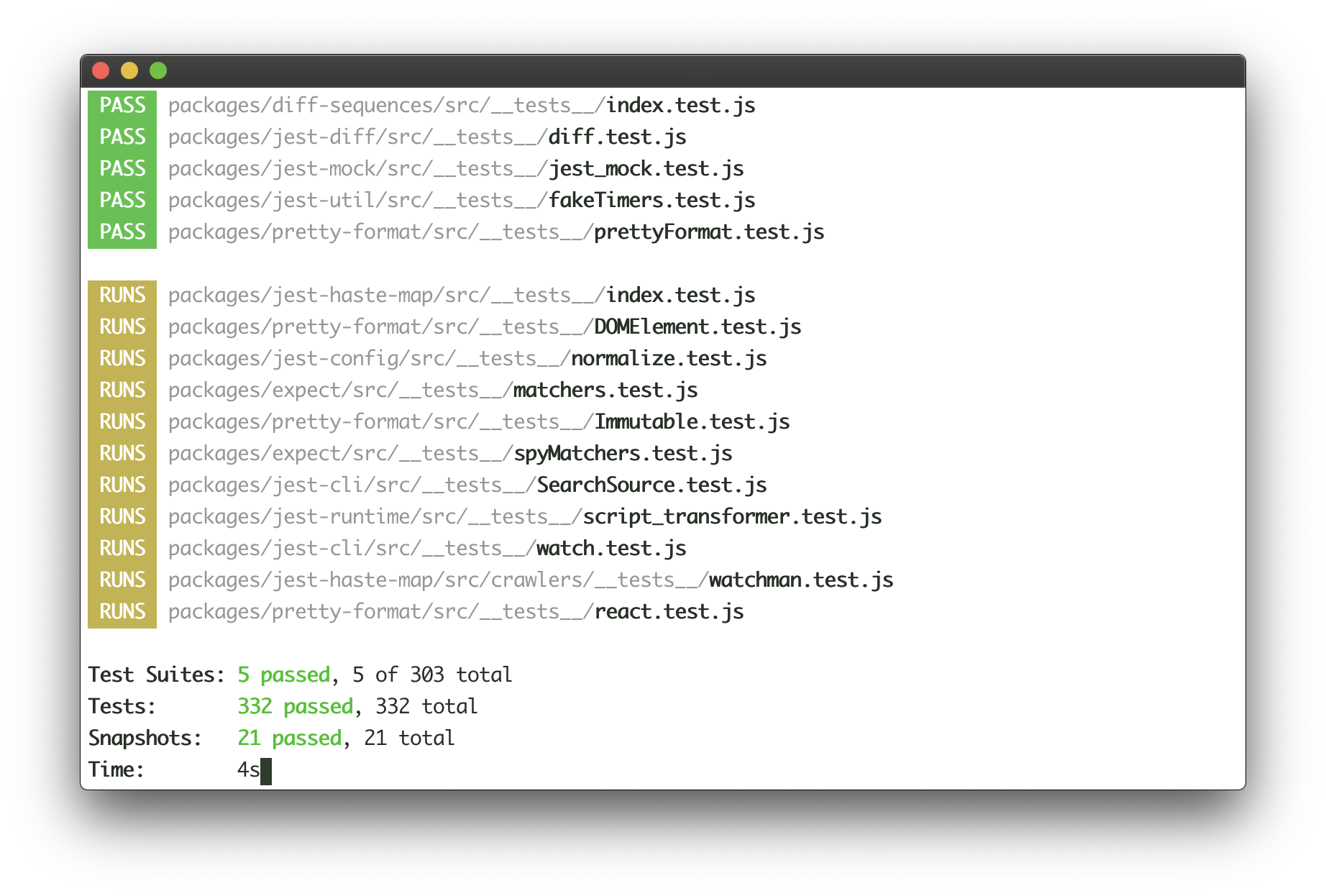
Example use case for this component is Jest's output:
|
|
|
|
|
|
|
|
Jest continuously writes the list of completed tests to the output, while updating test results at the bottom of the output in real-time. Here's how this user interface could be implemented with Ink:
|
|
|
|
```jsx
|
|
<>
|
|
<Static>
|
|
{tests.map(test => (
|
|
<Test key={test.id} title={test.title}/>
|
|
))}
|
|
</Static>
|
|
|
|
<Box marginTop={1}>
|
|
<TestResults passed={results.passed} failed={results.failed}/>
|
|
</Box>
|
|
</>
|
|
```
|
|
|
|
See [examples/jest](examples/jest/jest.js) for a basic implementation of Jest's UI.
|
|
|
|
#### `<AppContext>`
|
|
|
|
`<AppContext>` is a [React context](https://reactjs.org/docs/context.html#reactcreatecontext), which exposes a method to manually exit the app (unmount).
|
|
|
|
Import:
|
|
|
|
```js
|
|
import {AppContext} from 'ink';
|
|
```
|
|
|
|
##### exit
|
|
|
|
Type: `Function`
|
|
|
|
Exit (unmount) the whole Ink app.
|
|
|
|
Usage:
|
|
|
|
```jsx
|
|
<AppContext.Consumer>
|
|
{({ exit }) => (
|
|
{/* Calling `onExit()` from within <MyApp> will unmount the app */}
|
|
<MyApp onExit={exit}/>
|
|
)}
|
|
</AppContext.Consumer>
|
|
```
|
|
|
|
If `exit` is called with an Error, `waitUntilExit` will reject with that error.
|
|
|
|
#### `<StdinContext>`
|
|
|
|
`<StdinContext>` is a [React context](https://reactjs.org/docs/context.html#reactcreatecontext), which exposes input stream.
|
|
|
|
Import:
|
|
|
|
```js
|
|
import {StdinContext} from 'ink';
|
|
```
|
|
|
|
##### stdin
|
|
|
|
Type: `stream.Readable`<br>
|
|
Default: `process.stdin`
|
|
|
|
Stdin stream passed to `render()` in `options.stdin` or `process.stdin` by default.
|
|
Useful if your app needs to handle user input.
|
|
|
|
Usage:
|
|
|
|
```jsx
|
|
<StdinContext.Consumer>
|
|
{({ stdin }) => (
|
|
<MyComponent stdin={stdin}/>
|
|
)}
|
|
</StdinContext.Consumer>
|
|
```
|
|
|
|
##### isRawModeSupported
|
|
|
|
Type: `boolean`
|
|
|
|
A boolean flag determining if the current `stdin` supports `setRawMode`.
|
|
A component using `setRawMode` might want to use `isRawModeSupported` to nicely fall back in environments where raw mode is not supported.
|
|
|
|
Usage:
|
|
|
|
```jsx
|
|
<StdinContext.Consumer>
|
|
{({ isRawModeSupported, setRawMode, stdin }) => (
|
|
isRawModeSupported ? <MyInputComponent setRawMode={setRawMode} stdin={stdin}/> : <MyComponentThatDoesntUseInput />
|
|
)}
|
|
</StdinContext.Consumer>
|
|
```
|
|
|
|
##### setRawMode
|
|
|
|
Type: `function`<br>
|
|
|
|
See [`setRawMode`](https://nodejs.org/api/tty.html#tty_readstream_setrawmode_mode).
|
|
Ink exposes this function via own `<StdinContext>` to be able to handle <kbd>Ctrl</kbd>+<kbd>C</kbd>, that's why you should use Ink's `setRawMode` instead of `process.stdin.setRawMode`. Ink also enables `keypress` events via [`readline.emitKeypressEvents()`](https://nodejs.org/api/readline.html#readline_readline_emitkeypressevents_stream_interface) when raw mode is enabled.
|
|
|
|
**Warning:** This function will throw unless the current `stdin` supports `setRawMode`. Use [`isRawModeSupported`](#israwmodesupported) to detect `setRawMode` support.
|
|
|
|
Usage:
|
|
|
|
```jsx
|
|
<StdinContext.Consumer>
|
|
{({ setRawMode }) => (
|
|
<MyComponent setRawMode={setRawMode}/>
|
|
)}
|
|
</StdinContext.Consumer>
|
|
```
|
|
|
|
#### `<StdoutContext>`
|
|
|
|
`<StdoutContext>` is a [React context](https://reactjs.org/docs/context.html#reactcreatecontext), which exposes stdout stream, where Ink renders your app.
|
|
|
|
Import:
|
|
|
|
```js
|
|
import {StdoutContext} from 'ink';
|
|
```
|
|
|
|
##### stdout
|
|
|
|
Type: `stream.Writable`<br>
|
|
Default: `process.stdout`
|
|
|
|
Usage:
|
|
|
|
```jsx
|
|
<StdoutContext.Consumer>
|
|
{({ stdout }) => (
|
|
<MyComponent stdout={stdout}/>
|
|
)}
|
|
</StdoutContext.Consumer>
|
|
```
|
|
|
|
|
|
## Useful Components
|
|
|
|
- [ink-text-input](https://github.com/vadimdemedes/ink-text-input) - Text input.
|
|
- [ink-spinner](https://github.com/vadimdemedes/ink-spinner) - Spinner.
|
|
- [ink-select-input](https://github.com/vadimdemedes/ink-select-input) - Select (dropdown) input.
|
|
- [ink-link](https://github.com/sindresorhus/ink-link) - Link component.
|
|
- [ink-box](https://github.com/sindresorhus/ink-box) - Styled box component.
|
|
- [ink-gradient](https://github.com/sindresorhus/ink-gradient) - Gradient color component.
|
|
- [ink-big-text](https://github.com/sindresorhus/ink-big-text) - Awesome text component.
|
|
- [ink-image](https://github.com/kevva/ink-image) - Display images inside the terminal.
|
|
- [ink-tab](https://github.com/jdeniau/ink-tab) - Tab component.
|
|
- [ink-color-pipe](https://github.com/LitoMore/ink-color-pipe) - Create color text with simpler style strings in Ink.
|
|
- [ink-multi-select](https://github.com/karaggeorge/ink-multi-select) - Select one or more values from a list
|
|
- [ink-divider](https://github.com/JureSotosek/ink-divider) - A divider component.
|
|
- [ink-progress-bar](https://github.com/brigand/ink-progress-bar) - Configurable component for rendering progress bars.
|
|
- [ink-table](https://github.com/maticzav/ink-table) - Table component.
|
|
|
|
### Incompatible components
|
|
|
|
These are components that haven't migrated to Ink 2 yet:
|
|
|
|
- [ink-console](https://github.com/ForbesLindesay/ink-console) - Render output from `console[method]` calls in a scrollable panel.
|
|
- [ink-confirm-input](https://github.com/kevva/ink-confirm-input) - Yes/No confirmation input.
|
|
- [ink-checkbox-list](https://github.com/MaxMEllon/ink-checkbox-list) - Checkbox.
|
|
- [ink-quicksearch](https://github.com/aicioara/ink-quicksearch) - Select Component with fast quicksearch-like navigation
|
|
- [ink-autocomplete](https://github.com/maticzav/ink-autocomplete) - Autocomplete.
|
|
- [ink-broadcast](https://github.com/jimmed/ink-broadcast) - Implementation of react-broadcast for Ink.
|
|
- [ink-router](https://github.com/jimmed/ink-router) - Implementation of react-router for Ink.
|
|
- [ink-select](https://github.com/karaggeorge/ink-select) - Select component.
|
|
- [ink-scrollbar](https://github.com/karaggeorge/ink-scrollbar) - Scrollbar component.
|
|
- [ink-text-animation](https://github.com/yardnsm/ink-text-animation) - Text animation component.
|
|
- [ink-figlet](https://github.com/KimotoYanke/ink-figlet) - Large text component with Figlet fonts.
|
|
|
|
|
|
## Testing
|
|
|
|
Ink components are simple to test with [ink-testing-library](https://github.com/vadimdemedes/ink-testing-library).
|
|
Here's a simple example that checks how component is rendered:
|
|
|
|
```jsx
|
|
import React from 'react';
|
|
import {Text} from 'ink';
|
|
import {render} from 'ink-testing-library';
|
|
|
|
const Test = () => <Text>Hello World</Text>;
|
|
const {lastFrame} = render(<Test/>);
|
|
|
|
lastFrame() === 'Hello World'; //=> true
|
|
```
|
|
|
|
Visit [ink-testing-library](https://github.com/vadimdemedes/ink-testing-library) for more examples and full documentation.
|
|
|
|
|
|
## Maintainers
|
|
|
|
- [Vadim Demedes](https://github.com/vadimdemedes)
|
|
- [Sindre Sorhus](https://github.com/sindresorhus)
|
|
|
|
|
|
## License
|
|
|
|
MIT
|